
The Engineering Behind the Geometry
Geometry Optimization
- No CAD imports
- 100% native Revit geometry, optimized for performance
Intelligence & Logic
- CSV-driven geometry with Lookup Tables for massive product ranges, without file bloat
MEP System Integrity
- Proper connector setup (type, direction and linking)
- Flow settings
- Automatic calculations
Basic Data and standard compliance
- Less is more.
- Auto-mapping to VDI 3805 and or COBIe standards
File management & Versioning
- Clean system
- Type catalogs and or Content Catalog on request
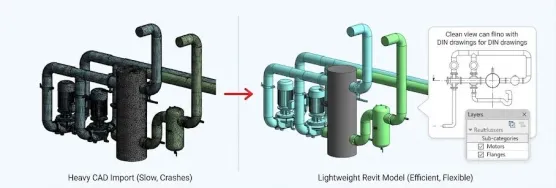
Geometry
Why "Lightweight" Matters: We prioritize computational efficiency without sacrificing visual accuracy. Most manufacturers over-model, causing Revit projects to slow down or even crash.
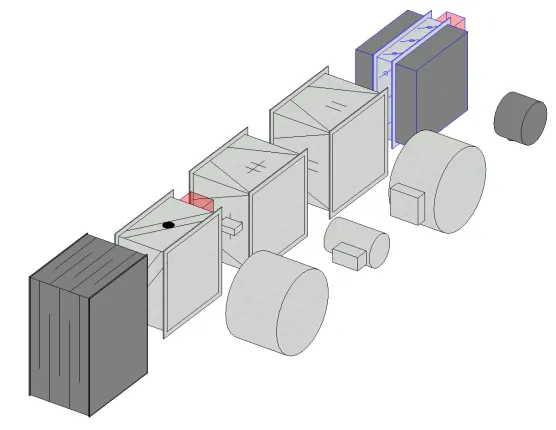
- Native Modeling: We remodel every component using native Revit tools. This allows for parametric flexibility and drastically reduces file size compared to imported CAD geometry.
- LOD Management (2D/3D Hybrid): We separate geometry for different views. In 3D, you get the necessary detail for coordination. In Plan Views, we utilize Lines to ensure your families produce clean, DIN-standard 2D drawings automatically—eliminating the need for manual drafting by the engineer.
- Visibility Control: Internal components (like motors, flanges, etc) are assigned to sub-categories for ease of use, and intuitive workflows.
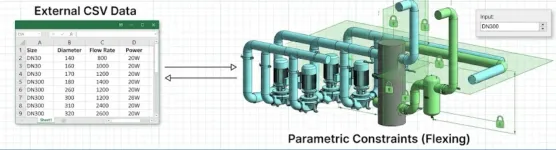
Intelligence & Logic
Handling Complexity with Data: Hard-coding thousands of SKUs directly into family parameters makes files unstable and slow. We use external data structures to manage complexity.
- Lookup Tables (.csv): Instead of endless if/then formula chains, we drive geometry and data through size_lookup functions linked to external CSV files. This allows a single family file to handle thousands of product variations (e.g., a valve range from DN15 to DN500) while keeping the RFA file lightweight.
- Constraints & Locking: We implement rigorous reference plane locking and constraints testing (“flexing”) to ensure the family remains stable even when custom values are input by the user.
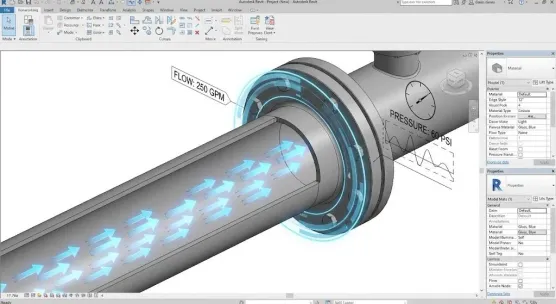
MEP System Integration
More Than Just 3D Models: A family is useless to an engineer if it doesn’t calculate. We ensure your product behaves like a real mechanical component in the digital twin.
- Connector Configuration: We precisely define Flow Direction (In/Out/Bidirectional) and System Classification (Hydronic Supply, Sanitary, etc.). This prevents “open connector” errors in the project.
- Pressure Drop Calculation: We map your technical data (Kv values, Zeta values, Pump curves) directly to the connectors. This enables leading calculation engines (like Revit native, liNear, or Solar Computer) to perform automatic hydraulic balancing and pressure drop calculations through your device.
- Electrical Coordination: For powered equipment, we include fully defined electrical connectors (Voltage, Load, Phase) to support cross-discipline collaboration.
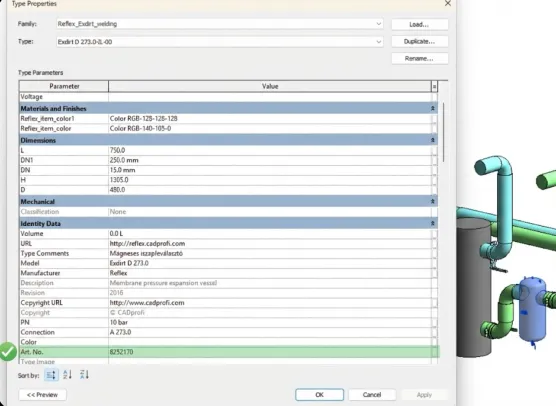
Data Management
Future-Proof Data Structure: Geometry is just the shell; data is the product. We ensure your content meets the strict standards of the DACH region and international BIM mandates.
- VDI 3805 / ISO 16757: We structure parameters to be fully compatible with VDI guidelines, ensuring your data is ready for German calculation workflows and the future of OpenBIM.
- Shared Parameters: We use a standardized Shared Parameter file to prevent “parameter pollution” in the engineer’s project.
- Classification: All families come pre-classified with OmniClass, UniClass 2015, and IfcExportAs parameters, making them ready for Facility Management (FM) exports and BIM Execution Plans (BEP).
File Management
User Experience (UX) for Engineers: We design families to be as easy to use as they are technically advanced.
- Type Catalogs (.txt): For products with massive variations, we generate external Type Catalogs. This means the Revit user doesn’t have to load all 500 valve types at once; they can select and load only the specific size they need from a list, keeping their project file lean.
- Content Catalog on Request: We can organize your entire portfolio into a container file or a cloud-based library structure, making it easy for design teams to browse and access your latest versions.
- Versioning: We implement internal version tracking parameters, so users can easily verify if they are using the latest, most up-to-date model from your manufacturing line.
Ready to upgrade your product catalog to these standards?
Let’s discuss how we can implement this optimization for your entire portfolio.
Trusted by
