
Is Your Content an Asset or a Liability?
Comprehensive Revit Family Audit. We identify why your models are crashing projects, failing calculations, or being rejected by engineers.
Geometry & Performance Analysis
- Identification of CAD imports
- Checking overuse of family nesting
- Checking overall geometry logic and intelligence
- Why it matters: Engineers delete heavy families to save their model performance.
MEP Logic & Connector Integrity
- Verification of Flow Direction, System Classification, and Connector Linking.
- Why it matters: This is the core if it is only a 3D model, or an actual part of the SYSTEM
Data Structure & Standard Readiness
- Ensuring data is present and stored in Shared Parameters rather than unstructured text descriptions.
- Why it matters: This is the essence of collaboration and calculations
File Hygiene & Stability
- Detection of unpurged materials, random line styles, and “junk” data.
- Why it matters: A clean file signals professional quality; a messy file suggests an amateur product. Also: filesize.
Usability
- “Flexing” tests to ensure geometry doesn’t break when sizes are changed.
- Why it matters: If engineers struggle to figure out your family in 60 seconds, they will switch to a working one..

Geometry
The “Silent Killer” of BIM Projects.
- Identification of CAD Imports: We scan the internal structure of your families to detect imported 3D geometry (3D DWG). These “foreign bodies” cannot be controlled properly in Revit and cause massive performance lags.
- Family Nesting Analysis: We check for the overuse of nested components. Deeply nested hierarchies (families inside families) unnecessarily bloat the file size and slow down project regeneration as well as making family editing nearly impossible.
- Geometry Logic & Intelligence: We evaluate if the geometry is built with native, parametric logic. Does it adapt intelligently to parameter changes, or is it just a static block?
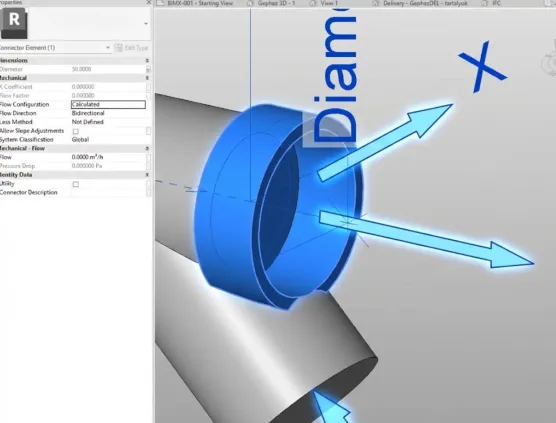
MEP Logic & Integrity
From “3D Block” to part of the SYSTEM.
- Connector Configuration Check: We verify the three pillars of a working MEP connector:
- Flow Direction: Is it correctly set to “In” or “Out”?
- System Classification: Is it specific (e.g., “Hydronic Supply”) or generic?
- Linking: Are the connectors linked internally to allow flow propagation?
- Calculation Readiness: We test if your component breaks the calculation chain.
- The Reality: If a strictly defined VDI workflow encounters an “Undefined” connector, the calculation stops. We identify these breaks before your customers do.
- Electrical Data (if applicable): We check for Voltage, Load, and Phase parameters on powered equipment to ensure coordination with electrical engineers.
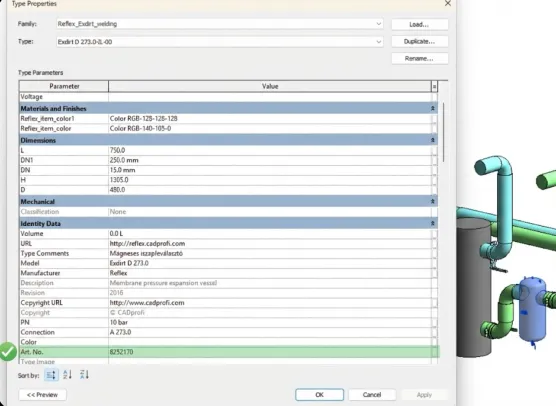
Data and Standard Readiness
Is your data “Trapped” or “Accessible”?
- Shared Parameter Validation: We audit your parameters to ensure you are using Shared Parameters rather than local Family Parameters.
- Why: Only Shared Parameters can be tagged in drawings and exported to schedules. Local parameters are useless for documentation.
- Shared parameters makes the logic driving parameters unified throughout the whole portfolio.
- Data Type Integrity: We check if technical values are stored correctly.
- Example: A pressure value must be a “Pressure” parameter type (Pa/Bar), not a simple “Text” parameter. If it’s text, calculation software cannot read it
- Identity Data: We verify if the basic identity data (Manufacturer, Model, URL, OmniClass) is populated and locked where necessary.
- VDI & ISO Readiness: We analyze if your data structure is separated enough to support mapping.
- The Check: Are “Nominal Diameter” and “Material” separate fields? If they are merged into one Description string, your content is not ready for automated VDI 3805 or COBie exports.
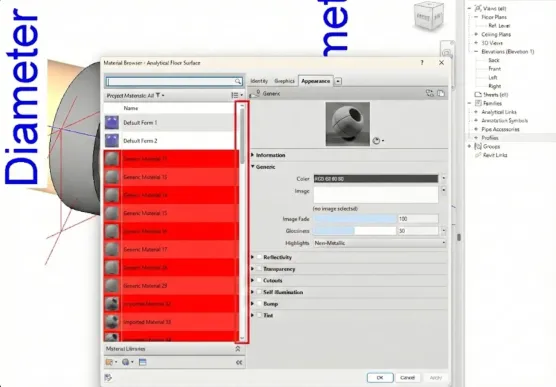
File Hygiene
Professionalism is in the Details.
- The “Purge” Audit: We scan for unused debris inside the file: duplicate materials, imported line patterns from CAD, and empty nested families.
- The Impact: A “dirty” file increases file size without adding value and pollutes the engineer’s project standards.
- Sub-Category Management: We check Object Styles to ensure your geometry is assigned to logical sub-categories (e.g., “Valve Handle” vs. “Valve Body”).
- The Impact: This allows engineers to visually control your product in their views (e.g., turning off handles in a coarse plan).
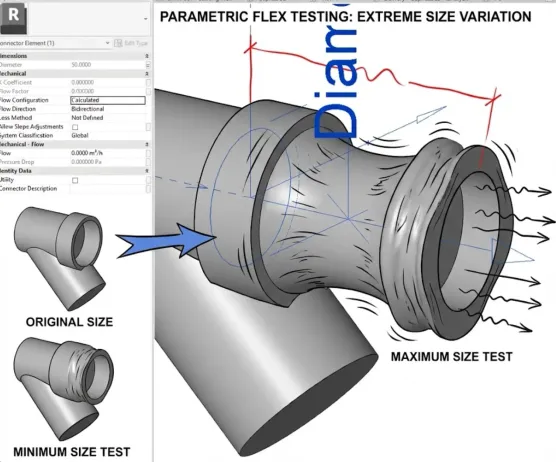
Usability
“Flexing” Stress Test: We push your families to their limits.
- The Test: What happens if we input a custom length? Does the geometry break? Do the constraints fail? A broken family erodes trust instantly.
- Type Catalog Validation: For product ranges with hundreds of variants, we check the external Type Catalog file.
- The Check: Does it load without errors? Are the column headers formatted correctly for Revit to read?
- Preview & Thumbnail: We check if the family has a clear, 3D preview image.
- UX Detail: Engineers choose visually. If your family looks like a wireframe mess in the browser, they might skip it.
The Deliverable: Your Traffic Light Report
We don’t just list problems; we give you a roadmap to fix them.
You will receive a comprehensive PDF report categorizing your library into three levels of urgency:
- 🔴 CRITICAL (Red): Issues that cause project crashes, broken calculations, or immediate rejection by engineers. Action: Must fix immediately.
- 🟡 WARNING (Yellow): Data structure gaps, missing VDI parameters, or heavy geometry. Action: Update required for standard compliance.
- 🟢 OPTIMAL (Green): High-quality content that meets industry standards.
Ready to Professionalize your Library?
Let us ensure your digital content reflects the high quality of your physical products.
Trusted by

Have a specific question before you start?
+36 70 602 9845Orosz Tamas · CTO